Free toolkit · Chapter 18, Metrics That Matter
Reporting Dashboards
The same operating truth looks different at four altitudes, and it changes hands as it climbs. See what good looks like at each one, then build your own with the templates below.
Why four dashboards
The green dashboard problem
A dashboard can be green while the operating model is drifting. Green usually means the activity finished, the provisioning ran, the review closed, the enrollment hit its target. Finished is not the same as right. And one report cannot serve everyone: an executive needs posture and direction, operations needs throughput and what still needs work, governance needs evidence that controls work. The same raw number means something different to each of them.
A dashboard can be green while the operating model is drifting.
The discipline is not producing more metrics. It is knowing who is reading, and what decision they are trying to make. Below is one way to see that in practice: a single signal, carried through four altitudes, from the raw operational floor up to the single page a board actually sees.
One signal, four altitudes
The same signal, shaped for four different readers
These examples follow three signals from one system (standing privileged access, leaver offboarding, and access review) as they climb from the operational floor to the boardroom. The numbers are a worked example from the book, not live data. Use them to see the shape, then build the real thing with your own numbers.
1. Operational view
For the app owners and identity teams who run the systemRaw and per-system. This is where the work actually happens: the overdue contractor gets deprovisioned, the standing admin accounts move to just-in-time, the reviewer who rubber-stamped 194 entitlements gets a conversation.
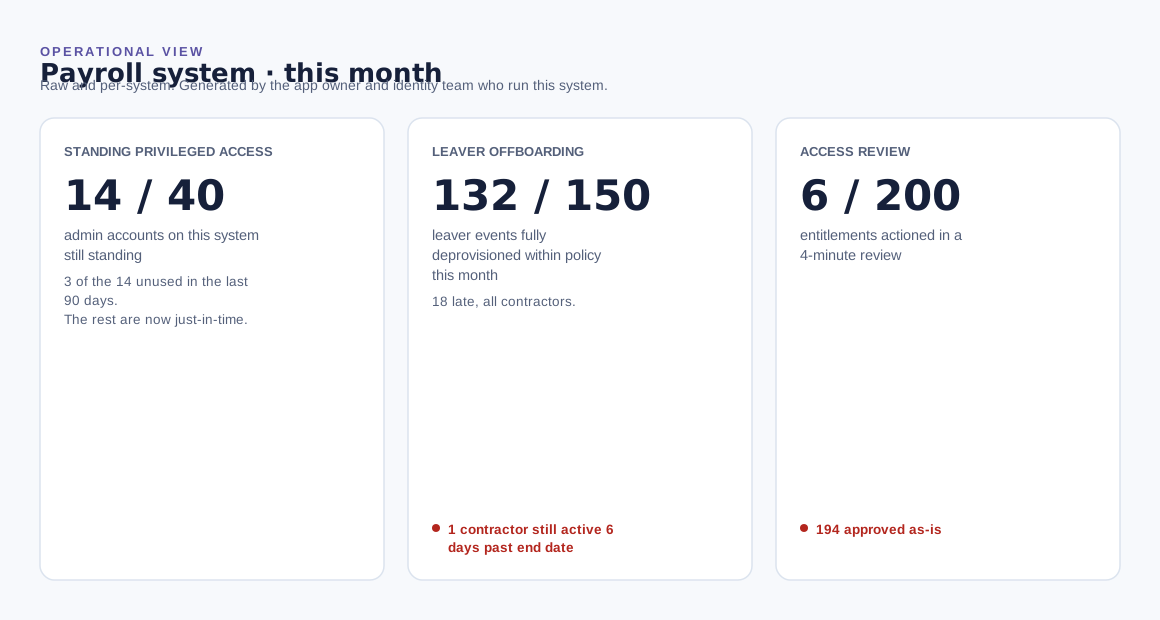
Standing privileged access: 14 of 40 admin accounts still standing, 3 unused in 90 days, the rest now just-in-time. Leaver offboarding: 132 of 150 leaver events deprovisioned on time this month, 18 late and all contractors, one contractor still active 6 days past end date. Access review: 6 of 200 entitlements actioned in a 4-minute review, the other 194 approved as-is.
2. Governance view
For sponsors and review bodiesThe operational floor consolidated into a rate and a trend. This is where the access review problem actually shows up: a perfect 100 percent completion rate sitting on top of a 3 percent action rate, reviews closing without changing anything.
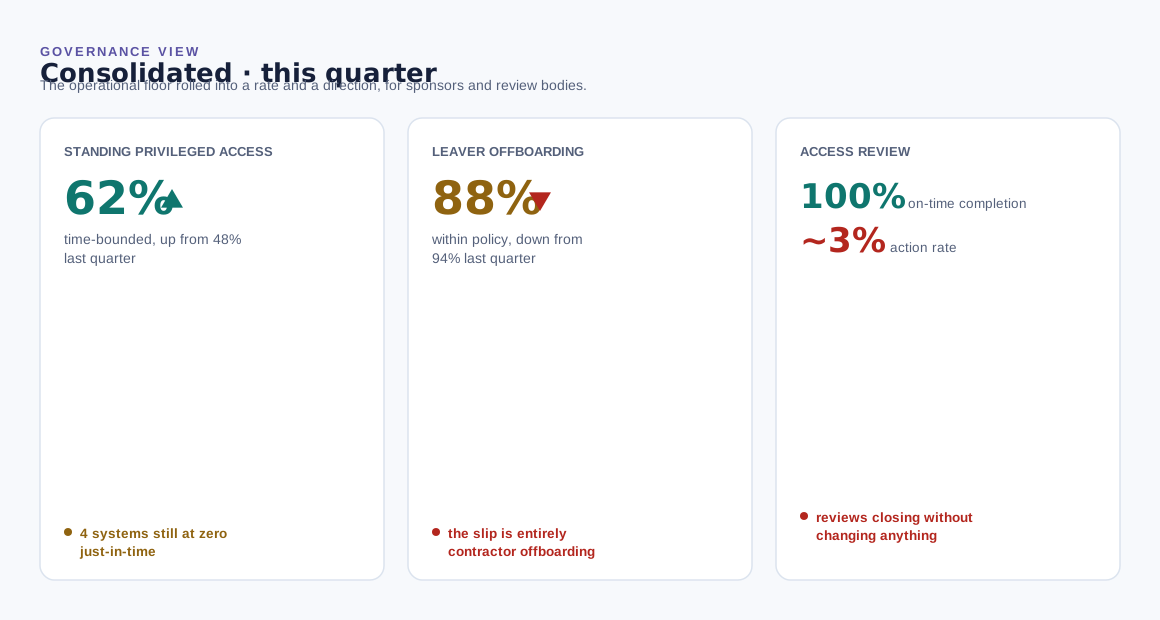
Standing privileged access: 62 percent time-bounded, up from 48 percent last quarter, 4 systems still at zero just-in-time. Leaver offboarding: 88 percent of leaver events within policy, down from 94 percent, the slip entirely in contractor offboarding. Access review: on-time completion 100 percent, action rate about 3 percent, reviews closing without changing anything.
3. Executive view
For leadershipPosture and direction only, none of the detail underneath. Leadership sees this so it can understand and back the work, not so it can do the fixing. When a risk is high or widespread, it escalates on purpose.
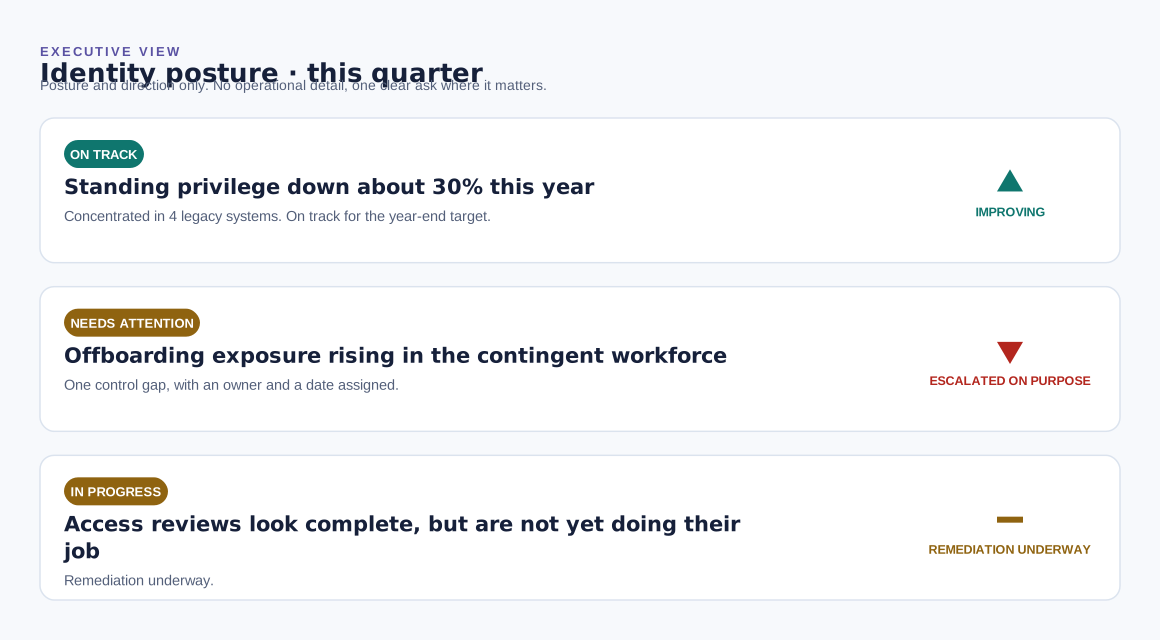
Standing privilege: down about 30 percent this year, concentrated in 4 legacy systems, on track for the year-end target. Offboarding exposure: rising in the contingent workforce, one control gap, with an owner and a date. Access reviews: look complete but are not yet doing their job, remediation underway.
4. Board view
For the board and the most senior executivesThere is one more altitude above executive reporting. The board rarely sees a column of metrics at all. It sees a single page: each domain reduced to a status and a direction. The discipline that keeps it honest is showing direction next to status, never status alone. A green that is failing underneath is worse than a yellow that is improving.
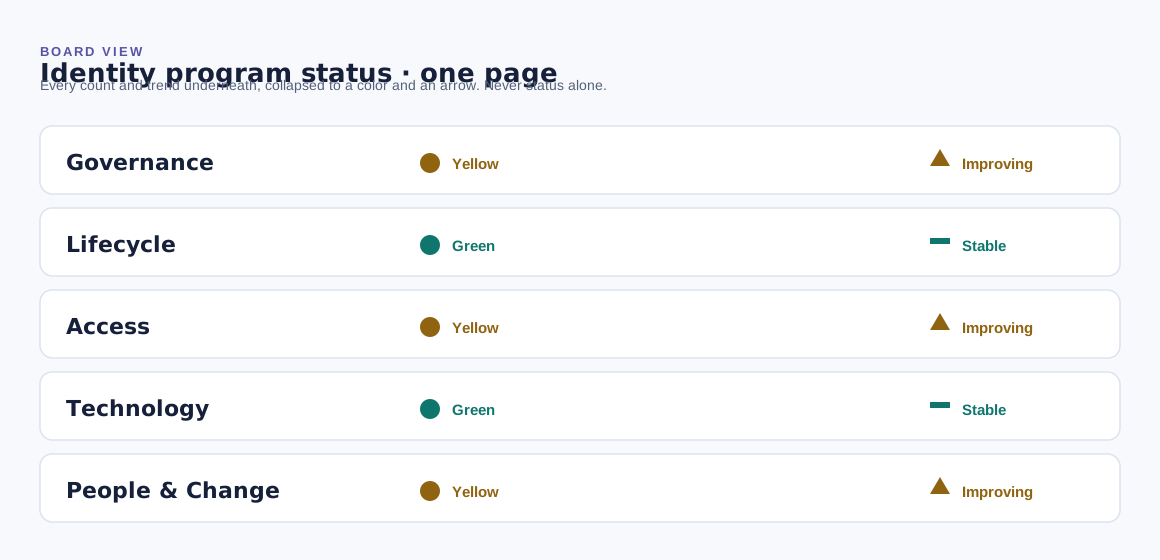
Governance: yellow, improving. Lifecycle: green, stable. Access: yellow, improving. Technology: green, stable. People & Change: yellow, improving.
Free templates
Build your own
These templates give you the starting structure for each altitude, and a completed example if you would rather start from something finished and work backward. Pull the metrics from your Identity Metrics Starter, fill them in by hand each cycle, and keep the discipline the board view depends on: direction next to status, never status alone.
Reporting Dashboard Templates (Excel)
One tab per altitude, a worked example matching the figures above, and a field guide on what to fill in and how to keep the roll-up honest.
Reporting Dashboard Templates, completed example (Excel)
The same workbook filled in end to end. Five systems carried through every altitude, so you can see what a finished roll-up actually looks like before you build your own. Illustrative numbers, not live data.
Reporting Dashboard Templates (PowerPoint)
A starter slide for each altitude, ready to adapt for a steering committee, a governance body, or a board packet.
One caution from the book, worth keeping close: if a full measurement program is more than you can take on, resist the urge to stand up a wall of dashboards in its place. A few measures that would actually change a decision beat a hundred that only get screenshotted for a steering committee.